 Binary Cipher
Choose one business outcome.
Start with a specific job such as explaining an audience change, building an onboarding series, or reviewing journey configuration.

Explore how Coworker can support campaign creation, audience intelligence, journey operations, performance analysis, and multi-team orchestration—then turn one use case into a governed, review-ready workflow.
No sign-up · no account connection · examples stay in this browser tab
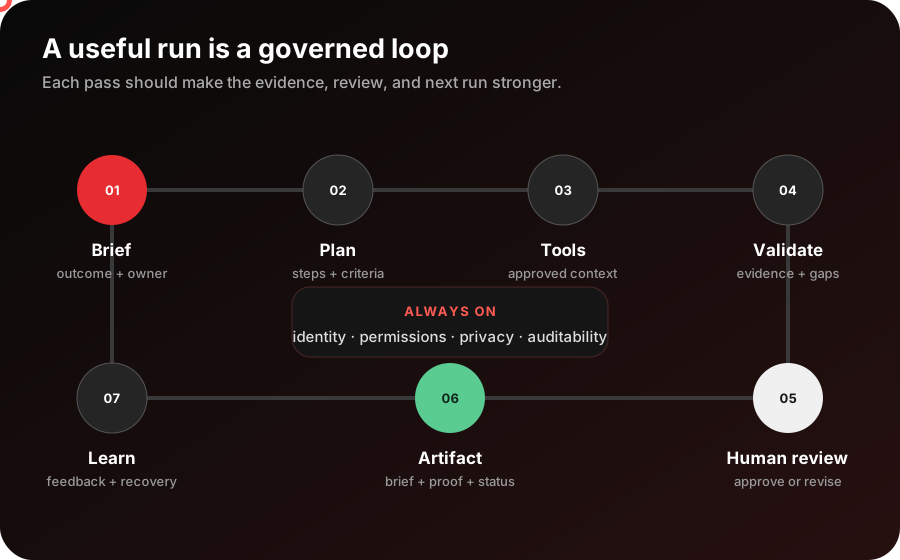
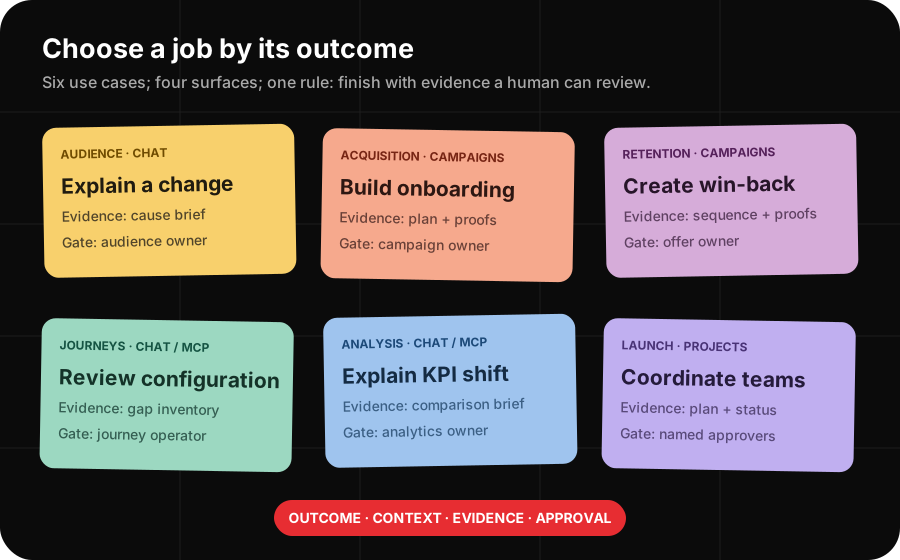
Choose an outcome, map it to the right Coworker surface, then add only the approved context and controls that job needs.
Start with a specific job such as explaining an audience change, building an onboarding series, or reviewing journey configuration.
Decide whether the job belongs in Chat, Campaigns, Projects, or an MCP-compatible client, then name the organization, sandbox, or data view.
Copy a starter prompt below, add non-sensitive context, and define the human review point before Coworker performs or proposes any consequential action.
The plan is deliberately short enough to use during a working session with a marketer, administrator, analyst, or implementation lead.
Name a decision, artifact, analysis, campaign, or coordinated workflow—not a vague request to “use AI.”
Chat, Campaigns, Projects, and CX Enterprise MCP support different jobs, interfaces, availability, and operating boundaries.
Organization, sandbox, data view, report suite, audience, journey, and campaign context determine what Coworker can inspect or change.
Permissions, validation, proofing, review, and audit evidence remain part of the workflow even when Coworker completes multiple steps.
Choose a job to see the best-fit Coworker surface, the working sequence, a human checkpoint, and a starter prompt. Availability still depends on your organization, licenses, permissions, and the product tools enabled today.
Turn a vague “the audience shrank” question into a governed investigation of definitions, data freshness, qualification, and activation health.
Confirm the Adobe organization, sandbox, audience, and comparison window.
Review audience logic, membership movement, source freshness, and activation signals available to the user.
Summarize likely causes, confidence, missing evidence, and the safest next check.
In organization [ORG] and sandbox [SANDBOX], explain why audience [AUDIENCE] changed between [PERIOD A] and [PERIOD B]. Separate definition changes, data freshness, qualification movement, and activation health. Show the evidence used, list what you could not verify, and recommend read-only next checks.Move from a campaign goal and approved audience to a structured welcome journey, on-brand messages, proof emails, and review artifacts.
Name the audience, value proposition, cadence, personalization fields, and success signal.
Create the plan, journey, and email drafts using the approved brand and template context.
Send proofs, review personalization, and iterate in the same conversation before launch.
Create a [NUMBER]-touch onboarding email series for [AUDIENCE]. Introduce [KEY VALUE], include [GETTING-STARTED RESOURCE], and personalize only with these approved fields: [FIELDS]. Use brand [BRAND], propose timing and success measures, and stop at a review-ready draft with proof emails.Build a focused win-back sequence with a clear inactivity rule, relevant incentive, controlled personalization, and proofable content.
Set the inactivity window, exclusions, channel consent, and eligible customer population.
Create two or three touches with a reason to return, controlled urgency, and simple calls to action.
Check suppression, incentive rules, personalization fallbacks, and proof rendering.
Create a [NUMBER]-email win-back campaign for customers who have not [QUALIFYING ACTION] in [WINDOW]. Exclude [SUPPRESSION RULES]. Use approved offer [OFFER], personalize with [FIELDS], propose a measurement plan, and return proof-ready drafts for human approval.Use available read-only Journey Optimizer product tools to inventory configuration, compare it with the intended launch contract, and flag gaps for an operator.
Confirm the organization, Experience Platform sandbox, campaign, and intended channel.
Inspect the campaigns and channel configurations exposed to the signed-in user.
Return mismatches, missing evidence, owners, and the next safe operator action.
In organization [ORG] and sandbox [SANDBOX], review campaign [CAMPAIGN] and its channel configuration against this launch contract: [CONTRACT]. Use read-only tools, cite the configuration evidence, separate confirmed gaps from unknowns, and produce an owner-routed checklist. Do not change the campaign.Turn a KPI movement into a structured comparison across time, segments, dimensions, and volume without losing the reporting context.
Name the data view or report suite, metric definition, date ranges, and material exclusions.
Break the shift down by reviewed dimensions, segments, and contribution while preserving grain.
Separate observed drivers from hypotheses and list follow-up analysis needed.
Using [DATA VIEW OR REPORT SUITE], explain why [METRIC] changed from [PERIOD A] to [PERIOD B]. Compare [DIMENSIONS] and [SEGMENTS], include denominators and volume, identify the largest observed contributors, and label hypotheses separately from evidence. Return a concise review brief.Structure intake, ownership, dependencies, approvals, content review, execution evidence, and status reporting in one long-running workspace.
Convert the launch brief into outcomes, workstreams, owners, dependencies, and acceptance evidence.
Coordinate tasks, approval gates, content feedback, risks, and unresolved decisions.
Summarize status by evidence, surface blockers, and preserve the decision trail.
Turn this approved launch brief into a coordinated project: [BRIEF]. Define workstreams, owners, dependencies, approval gates, evidence required for completion, and a weekly status format. Surface missing decisions and risks; do not infer approval or assign an owner who is not named.Showing use case 1 of 6: Explain an audience change.
Coworker is a family of experiences. Start with the work to be done, then confirm the module, connected products, permissions, and current availability for your organization.
Best for cross-product questions, structured investigations, planning, governed execution, validation, and reusable evidence.
Example: explain why an audience or KPI changed.Best for campaign plans, audiences, on-brand content, journeys, proof emails, and review-ready exports in one guided flow.
Example: build an onboarding or win-back series.Adobe describes Projects for multi-team intake, dependencies, approvals, content review, execution, and status reporting.
Example: coordinate an experience launch; confirm current availability.Best when a compatible client needs governed access to documented Adobe product tools under the signed-in user’s permissions.
Example: inventory Journey Optimizer configuration or query analytics context.Use field notes for the operating sequence, the sticky board for the use-case contract, or the system map for the governed end-to-end flow.
State the decision, artifact, campaign, analysis, or coordinated launch that should exist when the work is complete.
Route the job to Chat, Campaigns, Projects, or a compatible MCP client based on the work—not the interface.
Name the approved organization, sandbox, audience, journey, report suite, data view, dates, and comparison grain.
Specify the sources, checks, confidence, artifacts, and missing-data signals the answer must expose.
Let Coworker plan and use available tools, then inspect its output against the original acceptance criteria.
A named human accepts, rejects, or revises consequential work and records what should improve next time.
Mental model: a strong prompt is a compact operating contract—outcome, context, evidence, constraints, and human approval.
Use this sequence for both analytical and generative work. The surface changes; the governed operating contract does not.
Name the business decision or artifact and the observable conditions that make it useful.
Supply the organization, environment, objects, time window, brand, and source-of-truth definitions.
Confirm the Coworker module, available skills, connected tools, and whether each action is read or write.
Set privacy rules, exclusions, proofing, change limits, and the person who must approve.
Require sources, comparisons, confidence, missing evidence, change summaries, or proof artifacts.
Define what happens when tools fail, context is wrong, evidence conflicts, or approval is withheld.
A Coworker use case is ready to test when every sticky has a named owner and a concrete answer.
Coworker is most useful when a business goal passes through explicit context, governed tools, validation, and a human decision.
The map separates a polished answer from a trustworthy outcome: the latter carries context, evidence, controls, and a human decision.
CX Enterprise Coworker field notes selected.
Begin with one measurable outcome, make the context and evidence explicit, and keep the first run bounded enough for a person to inspect.
Write the decision or artifact, audience, owner, deadline, and measurable acceptance criteria.
Match the workflow to Chat, Campaigns, Projects, or an MCP client and verify current availability.
Select the organization, environment, product objects, time window, definitions, and approved brand inputs.
Declare exclusions, privacy boundaries, permission limits, proof requirements, and the human approval gate.
Let Coworker plan and act, then compare the result with the requested evidence contract and acceptance criteria.
Accept, revise, or reject the result; record the learning before expanding data, actions, teams, or automation.
Follow one analytical use case from a vague symptom to evidence an audience owner can review.
“Explain the 18% audience decline since July 15 and recommend the safest next check—do not change the audience.”
The organization, sandbox, audience, comparison window, source definitions, and activation destination are explicit.
The plan checks audience logic, data freshness, qualification movement, and activation health using only available read permissions.
The result separates observations from hypotheses, exposes missing evidence, and gives the owner a bounded next action.
The product is moving quickly, so availability statements and setup steps link to current Adobe documentation instead of being treated as permanent.
Use Adobe’s product and use-case guidance to choose a concrete outcome before you write a prompt or request a new workflow.
Adobe prompt patterns for onboarding, nurture, events, conversion, upsell, retention, and re-engagement campaigns.
Coworker Chat overviewHow Coworker Chat turns natural-language goals into plans, governed actions, validation, artifacts, and saved work.
Coworker Campaigns overviewThe focused campaign workflow for plans, audiences, on-brand content, journeys, proofs, and export.
CX Enterprise Coworker homeAdobe’s current top-level map for Coworker Chat, Campaigns, and Projects.
The unified Adobe endpoint, supported product tools, permission model, and current read/write boundaries.
Install Adobe CX Enterprise MCPConfigure the remote endpoint, sign in, and select the organization, sandbox, and data-view context a use case requires.
Access CX Enterprise MCP toolsCheck the licenses, organization enablement, beta status, and user permissions required by each product tool.
Confirm the active organization, account type, and Adobe Org ID before attaching a workflow to product data.
CX Enterprise Admin ToolInspect user entitlements, product profiles, roles, instances, and last access for the people running the use case.
Manage users and roles in Experience PlatformInspect roles and resource permissions for Experience Platform use cases such as audience explanation.
A decision, artifact, analysis, campaign, or coordinated workflow with an owner and acceptance criteria.
A structured way for Coworker to perform a task, validate it, and return evidence—not a new product entitlement.
A connection that lets Coworker or a compatible client use documented tools under Adobe authentication and existing permissions.
The organization, sandbox, data view, report suite, audience, journey, dates, definitions, and brand inputs required by the task.
A required review before a consequential action is accepted or executed, with permissions and auditability preserved.
A brief, comparison, source list, proof, change summary, confidence statement, or missing-data note that supports a decision.
This sequence turns a demo prompt into a bounded workflow a CX team can inspect, govern, and improve.
Prompt polish cannot replace the right product context, permissions, source definitions, validation, and named human owner.
Expand only after one low-risk use case repeatedly returns useful evidence within the agreed controls.
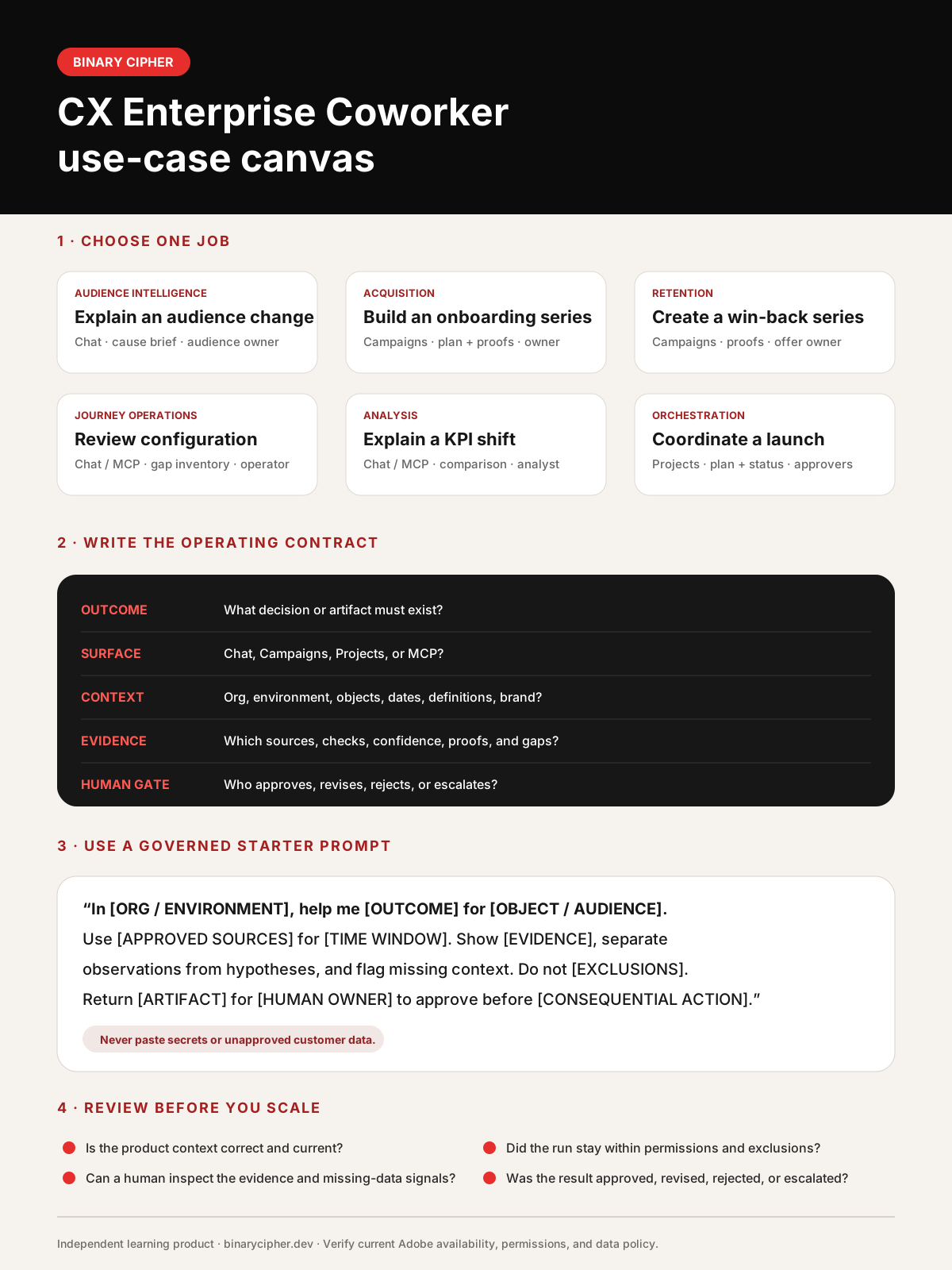
The one-page artifact helps a marketer, analyst, administrator, and implementation lead choose a Coworker job, route it to the right surface, define context, set an evidence contract, and name the approval gate.
Independent product: Binary Cipher is not Adobe, and this lab is not an Adobe entitlement checker, support portal, or account integration. Adobe, Experience Cloud, and CX Enterprise Coworker are Adobe product names. Product availability, trials, credits, permissions, supported tools, and terms can change. Last content review: July 30, 2026.